Make a game for Game Scroll
Every game in the feed is one small JavaScript file. Write yours, send it in, and once it's merged it streams to every player's phone within minutes, credited to you. No app update, no store review.
How it works
- Write one file. Your game lives in
src/games/your-game.js. It draws on a canvas and reacts to touches. The app handles the rest: the start screen, the game-over screen, scores, credits, sizing for every phone. - Try it on your phone. Run the app on your computer and open it on your phone over Wi-Fi.
- Open a pull request on GitHub. Automatic checks play your game in a headless browser, then Rob plays it.
- It goes live. When it's merged, your game streams into the feed for everyone, with your name on it.
You'll need some JavaScript. If you've made something with an HTML canvas before, you're ready. If not, copy the starter game below and change one thing at a time.
The rules
- Original games only. Take inspiration from a genre or a mechanic (falling blocks, kart racing, platformers), but don't recreate a specific existing game: no copied names, characters, art, music, levels or look, even renamed.
- A new mechanic. The goal is 1,000 games that each play differently. A reskin or harder version of a game already in the feed won't be merged. Browse every game in the feed and the ideas list first.
- Quick to learn, quick to play. A player should get it from a one-sentence hint. A round lasts about 20 seconds to 3 minutes.
- Self-contained. One file, everything drawn in code. No image, font or sound files, no network requests, no tracking, no ads, no links out of the app.
- Touch first. Every game must be fully playable with touch alone. Sensors are welcome as an extra.
- Family friendly. Cartoon action is fine. No gore, hate, real-money gambling, or anything you wouldn't show a 12-year-old.
1. Get set up
Option A: on your computer
Install Node.js 22 or newer and Git. Then fork the repository on GitHub (you need a free GitHub account) and run:
git clone https://github.com/YOUR-NAME/game-scroll.git
cd game-scroll
npm install
npm run dev
Open the address it prints. On a desktop browser, Space starts a game, the arrow keys steer and ↓ goes to the next game. To try it on your phone, open the "Network" address on your phone while it's on the same Wi-Fi.
Option B: in your browser, nothing to install
Fork the repository, then on your fork click Code → Codespaces → Create codespace. You get an editor in the browser. In its terminal, run npm install and npm run dev, then open the forwarded port it offers. GitHub gives every account free Codespaces hours each month.
2. Write your game
Create src/games/tap-bubbles.js (the file name must match the game's id). This is a complete, working game you can start from:
import { sfx } from '../sfx.js';
import { haptic } from '../kit/device.js';

const W = 360, H = 640;

function make(api) {
  let bubbles, score, t, missed;
  return {
    reset() { bubbles = []; score = 0; t = 0; missed = 0; },
    update(dt) {                       // dt is in seconds
      t += dt;
      if (Math.random() < dt * (1 + t / 10)) bubbles.push({ x: 30 + Math.random() * (W - 60), y: H + 30, r: 24 });
      for (const b of bubbles) b.y -= dt * (90 + t * 4);
      missed += bubbles.filter(b => b.y < -30).length;
      bubbles = bubbles.filter(b => b.y >= -30);
      if (missed >= 3) { haptic('warning'); api.over(); }
    },
    draw(c) {                          // a 2D canvas context, W x H units
      c.fillStyle = '#16212e'; c.fillRect(0, 0, W, H);
      c.fillStyle = '#5aa8ff';
      for (const b of bubbles) { c.beginPath(); c.arc(b.x, b.y, b.r, 0, 7); c.fill(); }
    },
    down(x, y) {                       // already in game units
      const i = bubbles.findIndex(b => Math.hypot(b.x - x, b.y - y) < b.r + 8);
      if (i < 0) return;
      bubbles.splice(i, 1); api.score(++score);
      haptic('light'); sfx(520 + score * 10, .06, 'triangle', .04);
    },
  };
}

export default {
  id: 'tap-bubbles', title: 'Tap Bubbles',
  tag: 'Casual · Reflex',             // "<Style> · <Genre>"
  retro: false, w: W, h: H,
  goal: 25,                           // the score that counts as a win
  hint: 'Pop the bubbles before they float away. Miss three and it is over.',
  make,
};
Then jump straight to it: open the browser console and run __gs.only('tap-bubbles').
What your game gets and gives
| Your game object | When it's called |
|---|---|
reset() | Before every round. Put all round state here so "Play again" starts clean. |
update(dt) | Every frame while playing. dt is seconds since the last frame. |
draw(ctx) | Every frame. Draw the whole frame; nothing is cleared for you. |
down / move / up(x, y, id) | Touches, in game units. id tells fingers apart for two-thumb controls. |
key(k, isDown) | Optional keyboard support for desktop. |
resize(w, h) | Optional, for games that grow to fill big screens. |
The api | What it does |
|---|---|
api.score(n) | Sets the score. Reaching goal wins credits; the game keeps going. |
api.over() | Ends the round. |
api.win() | Wins right now, for games with a natural end. |
api.has('item') | True when the player bought that shop item for this run. |
The hint and the genre in tag also feed the recommender, so mention the control (tap, drag, tilt...) and the genre honestly.
3. Pick a style
Every game picks one of six looks. The style sets the frame around your game, the start and game-over screens, and which tab it appears in.
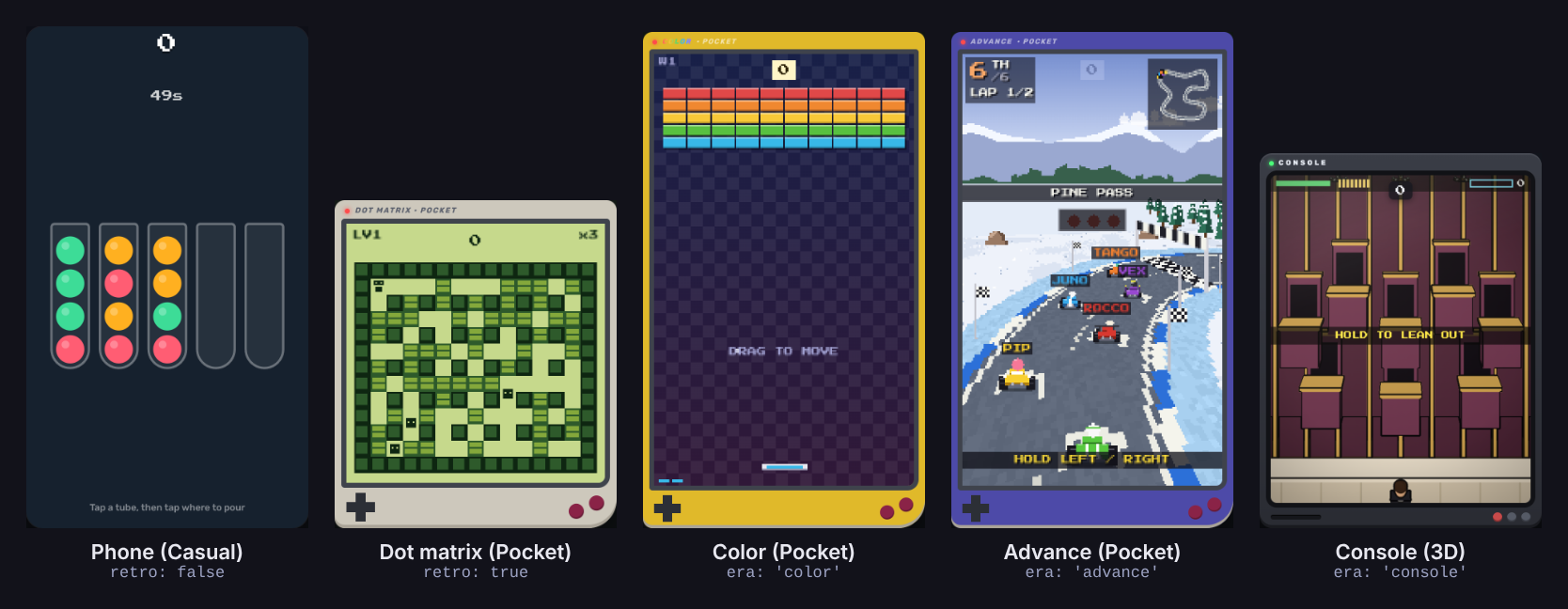
| Style | Set | Typical size | Look |
|---|---|---|---|
| Casual | retro: false | 360 × 640 | Full screen, smooth, any colours. |
retro: true, pal: 'moss' | 160 × 160 | Handheld shell, chunky pixels, exactly 4 shades. | |
| Color | era: 'color' | 160 × 160–192 | Coloured handheld, bright 16-colour palette. |
| Advance | era: 'advance' | 176–192 wide | Wider handheld, detailed sprites, parallax. |
| Classic Console | era: 'console' | 192 × 160, fluid | Real-time cel-shaded 3D with the shared toon kit. |
| Next Gen | era: 'nextgen' | 300 × 300, fluid | HD 3D: real materials, shadows, bloom, particles. |
Retro styles also set retro: true and a shell colour with pal. The 3D styles share one renderer, so never make your own WebGL context. The full contributor guide has the palettes, code samples for each style, and the 3D kits.
Big screens and foldables
Players use everything from small phones to unfolded Galaxy Z Fold and iPhone foldables, and can fold mid-game. By default your canvas is scaled to fit. To fill the extra space, add maxW and maxH and a resize(w, h) method; the app picks the best size and tells you. Keep the game fair at every size.
4. Sound, haptics and phone sensors
Import shared helpers from the app; it hands them to streamed games:
src/sfx.js:sfx(freq, duration, type, volume)for short synth sounds. Respects mute.src/kit/device.js:haptic(),buzz(),tilt(),onShake(),heading(),faceDown(),location(),startMic(),startCamera().src/util.jsandsrc/palettes.js: maths helpers, pixel sprites, palettes.
Sensors return nothing in the browser or when a player says no, so every sensor game needs a touch fallback: drag instead of tilt, tap instead of shout. Stop the mic or camera when the round ends. Location, camera and mic data must never leave the phone.
5. Credits and shop items
Winning any game pays credits, which is why goal is required. Pick a goal a decent player reaches in about a minute. You can also sell items for credits:
reward: 10,   // credits per win; the first win pays double
shop: [
  { id: 'shield', name: 'Shield', price: 25, kind: 'boost', desc: 'Survive one crash.' },
  { id: 'gold', name: 'Gold Skin', price: 150, kind: 'unlock', desc: 'Forever gold.' },
],
// in your game: if (api.has('shield')) { ... }
6. Test it
Play it on a real phone if you can: check the controls feel good with a thumb, the hint makes sense, and the goal is reachable. Then run the same checks the pull request runs:
npm i --no-save playwright && npx playwright install chromium   # first time only
npm run build:bundled
node scripts/smoke.cjs tap-bubbles    # plays it with random input; fails on any error
node scripts/fold.cjs tap-bubbles     # folds and unfolds the screen mid-game
node scripts/sweep.cjs tap-bubbles    # long play at odd sizes (needed for 3D games)
npm run games                         # fails if the file name and id differ
7. Submit it
- Commit your game file on a branch of your fork and push it.
- On GitHub, open a pull request against
mainof robthewizzuk/game-scroll. - Fill in the template: what the game is, why its mechanic is new, its style, and a screenshot or short clip.
- The automatic checks build the app and play your game. Fix anything they flag.
- Rob plays it and may ask for changes. Games that break the rules or play too much like one already in the feed may be turned down.
A game pull request should only add or change your file in src/games/. Changes to shared code ship inside the app and need an app update, so open those separately and explain why.
After it's merged
You don't need to do anything. Every merge builds each game as its own small file and uploads it with a new catalogue. Phones check the catalogue regularly, so your game appears in feeds within minutes, credited to you by your GitHub name. Fixes reach players the same way.
Games that turn out weak or broken in play testing may be hidden or removed later.
Your rights
Game Scroll's code is under the PolyForm Shield licence: you can read, run, fork and change it, but not use it for a product that competes with Game Scroll. When you open a pull request you confirm the game is your own original work, you keep the copyright, and you give the project a permanent licence to use, change and ship it, including in the app stores. The exact terms are here.
Not a coder?
Ideas are welcome too. Suggest a game idea on GitHub: describe how it plays in a few sentences, and it may become one of the 1,000.